



Multi-Factor Authentication: The Powerful Security Step That Stops Account Theft
A stolen password should not be enough to unlock your email, banking app or social media account. Unfortunately, many people still rely on a single password as the only barrier between their personal information and a criminal. That is why multi-factor authentication has become one of the most practical security upgrades available to ordinary internet users.
Multi-factor authentication adds another check before an account allows access. Even when a criminal obtains a password through a data breach, a fake login page or a phishing message, the attacker may still be blocked because a second form of verification is required. The extra step in multi-factor authentication may involve an authenticator app, a security key, a trusted device, a biometric check or a temporary code.
The protection is valuable, but the details matter. Some methods are stronger than others, and scammers increasingly try to trick people into approving unexpected prompts or sharing login codes. This article explains how multi-factor authentication works, which accounts should be protected first and how to choose a safer option without making everyday logins unnecessarily complicated.
What Is Multi-Factor Authentication?
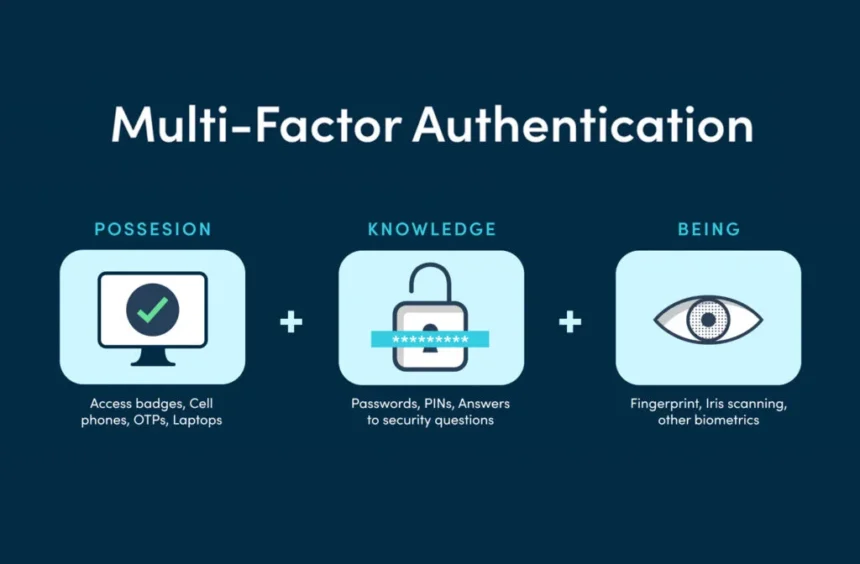
Multi-factor authentication, often shortened to MFA, is a login method that requires more than one type of proof before granting access to an account. A password is usually the first layer. The account then asks for another factor that is harder for an attacker to obtain at the same time.
The FTC advice groups authentication factors into three broad categories:
| Authentication Factor | Simple Meaning | Common Examples |
|---|---|---|
| Something you know | Information stored in your memory | Password, PIN or security answer |
| Something you have | A trusted item or device | Phone, authenticator app, hardware key or device prompt |
| Something you are | A physical characteristic | Fingerprint, face scan or other biometric check |
A genuine multi-factor authentication process combines different categories. Entering a password and then answering a security question is not as strong because both steps rely on information that you know. A password followed by a security-key tap is stronger because the attacker would need both the password and the physical device.
Some services call the feature two-factor authentication or two-step verification. The labels differ, but the everyday goal is similar: create an additional barrier so that a password alone does not control the account.
For a broader explanation of online protection, read The News Ink’s cybersecurity guide.
Why Passwords Alone Are No Longer Enough
Passwords remain useful, but they are exposed to several common weaknesses. People reuse them across different websites, choose familiar phrases and sometimes enter them into fake login pages. Criminals may also obtain credentials from breaches and test the same email-and-password combination on other services.
The problem becomes more serious when the compromised account is your main email inbox. Email often acts as the reset key for shopping accounts, cloud storage, social profiles and payment services. A criminal who controls your inbox may request password resets, hide warning messages and impersonate you when contacting other people.
Using password managers helps because every account can have a different password. However, a unique password should still be supported by multi-factor authentication on important services. The two protections solve different problems: a password manager limits the damage caused by reuse, while multi-factor authentication creates an additional obstacle after a password has been stolen.
How Multi-Factor Authentication Stops Account Theft
The main strength of multi-factor authentication is simple: the criminal needs more than a password. Imagine that a fake delivery message leads to a convincing login page. The victim enters an email address and password, but the email provider then asks for a security-key tap or an approval on a trusted device. The attacker cannot complete the login without that second step.
This does not mean every attack automatically fails. A scammer may ask the victim to share a temporary code or approve a notification. That is why people must understand the rule behind multi-factor authentication: an unexpected login request should be denied, not approved simply because it appears on your phone.
The CISA guidance explains that any MFA is better than none, although some methods offer much stronger protection than others. The most useful approach is to turn on an available option immediately and then upgrade sensitive accounts to a stronger method when possible.
Which Multi-Factor Authentication Method Is Best?
Not every method provides the same level of security. The strongest choice available to you may depend on the website, app and device. The following comparison offers a practical ranking.
| Method | Protection Level | Main Advantage | Important Limitation |
|---|---|---|---|
| Passkey or hardware security key | Strongest option for most users | Designed to resist phishing and does not rely on a reusable password code | Not every service offers support yet; a backup plan is still needed |
| Authenticator app | Strong | Codes are generated in an app rather than sent through your phone network | A scammer may still trick a user into entering a code on a fake page |
| Device prompt with number matching or login details | Good | Convenient and may show the device or location requesting access | Never approve a prompt you did not initiate |
| Text-message code | Better than a password alone | Easy to set up and widely supported | Phone numbers can be targeted through SIM-swap attacks |
| Email code | Better than no second step | Useful when stronger choices are unavailable | Weak if the email account itself has already been compromised |
| Security questions only | Limited | Easy to remember | Answers may be guessed, discovered online or stolen |
FTC guidance advises that text or email codes are better than nothing but that authenticator apps and security keys are safer options when available. This is a sensible rule for most people: do not leave an account unprotected while waiting for the perfect setup, but strengthen the accounts that matter most.
Passkeys and Security Keys Offer Stronger Protection
Security keys are physical devices used to verify a login. They are especially useful for email, work accounts and other services where a takeover could cause serious damage.
Passkeys are related but more flexible. The FIDO Alliance explains that passkeys replace passwords with cryptographic credentials stored on a device or through a trusted credential provider. A passkey is unlocked with the same method used to unlock the device, such as a fingerprint, face scan or PIN. Because the login is connected to the legitimate website or app, passkeys are designed to resist phishing.
A passkey does not always look like traditional multi-factor authentication because the user may not type a password and then enter a separate code. However, modern systems can still use more than one form of proof behind the scenes, such as possession of a trusted device and a biometric or PIN check. Microsoft’s passwordless guidance explains why organizations are increasingly moving toward phishing-resistant sign-in methods.
Use a passkey when a trusted service offers one and you understand how account recovery works. For services that still rely on passwords, continue using multi-factor authentication.
Authenticator Apps Are a Strong Everyday Choice
An authenticator app is often the best practical option when passkeys or security keys are unavailable. It generates temporary codes or sends prompts that help confirm a login attempt. Unlike text messages, authenticator-app codes are not delivered through the phone network, so they are not exposed to the same SIM-swap risk. Setup usually involves scanning a QR code from the website’s security settings and saving recovery information.
Authenticator apps are convenient, but users still need to remain alert. A scammer can create a fake login page and ask for a temporary code immediately after stealing a password. Never enter a code after following an unexpected link. Open the official app or type the known website address yourself. The News Ink’s article on phishing scams explains the warning signs to check before entering any credentials.
Text Messages Are Useful but Not the Strongest Choice
Text-message codes remain common because they are simple. When an account offers no stronger option, enabling a text code is generally better than leaving the account protected by a password alone. However, a criminal may try to take control of a phone number through a SIM-swap attack, trick the victim into sharing a code or read notifications on an unlocked phone.
Use text-message multi-factor authentication when it is the best available choice, but upgrade sensitive accounts to an authenticator app, passkey or security key when possible.
Never Share a Login Code
One of the most important safety rules is also one of the simplest: never share a login code with someone who contacts you unexpectedly. A genuine support agent, bank representative or delivery company should not ask you to read out a verification code that appeared after an unrequested login attempt.
Scammers often create a believable story. They may claim that the code is needed to cancel a payment, protect an account or confirm your identity. In reality, the attacker may already have your password and need the code to complete the takeover.
The Google guidance repeatedly warns users not to share verification codes. It also explains that text or call codes can be vulnerable to phone-number-based attacks and that passkeys or hardware keys can offer stronger phishing protection.
Watch for MFA Fatigue Attacks
Some criminals send repeated login prompts after stealing a password. The aim is to annoy, confuse or frighten the victim until one approval is granted by mistake. This is sometimes called MFA fatigue or push bombing.
Treat every unexpected prompt as a security warning. Deny the request, change the account password from the official website or app and review recent account activity. If the service provides a way to report the attempt, use it. Do not approve a request merely to stop the notifications.
A prompt that includes a number-matching step or login details can be safer than a simple approve-or-deny button because it forces the user to compare information. Even then, multi-factor authentication only works properly when users approve requests they personally initiated.
Protect These Accounts First
Turning on multi-factor authentication everywhere is ideal, but beginners do not need to complete every account in one sitting. Start with the services that could cause the greatest damage if compromised.
| Priority | Account Type | Why It Matters |
|---|---|---|
| 1 | Main email account | It can reset passwords for many other services |
| 2 | Password manager | It may store credentials for multiple accounts |
| 3 | Banking and payment apps | A takeover could expose money or transaction details |
| 4 | Work or school accounts | They may contain private files, contacts and shared systems |
| 5 | Cloud storage | Personal documents and photographs may be stored there |
| 6 | Social media | Criminals may impersonate you or scam your contacts |
| 7 | Shopping accounts | Saved cards, addresses and order history may be exposed |
How to Set Up Multi-Factor Authentication Safely
The multi-factor authentication process differs slightly between services, but the following routine works well for most accounts:
- Open the official website or app directly rather than using a link from an email.
- Go to the security, login or account-settings section.
- Look for multi-factor authentication, two-factor authentication or two-step verification.
- Choose the strongest option supported by the service and your devices.
- Set up a passkey, security key or authenticator app when available.
- Use text-message codes only when stronger methods are not offered or are not practical.
- Save recovery codes in a secure offline location.
- Add a backup method where the service allows it.
- Test the login process before signing out of every trusted device.
- Review account activity and remove devices you no longer use.
CISA also provides an MFA toolkit that explains how people can find the feature in security settings and activate it on common online services.
Store Recovery Codes Carefully
Recovery codes are easy to overlook during setup. They matter because a lost phone, damaged security key or changed number can make account access difficult. Store the codes securely before an emergency occurs.
Do not keep the only copy in an unlocked note on the same phone used for login. A printed copy stored safely at home may work for personal accounts. A securely protected password-manager note may also be suitable, provided the vault itself has a separate recovery plan. Businesses should use an approved process rather than leaving codes in shared documents or chat messages.
Backup methods need the same care as the primary method. Multi-factor authentication can be undermined by a weak recovery route.
Common Mistakes That Reduce Protection
Multi-factor authentication is effective, but careless habits can weaken it. Avoid these mistakes:
- Approving a prompt you did not personally trigger.
- Sharing a verification code during an unexpected call or message.
- Using only an email code when the email account itself is poorly protected.
- Leaving recovery codes in an unlocked note or shared file.
- Choosing “trust this device” on a public or shared computer.
- Ignoring security alerts after repeated login attempts.
- Keeping old phone numbers or unused devices connected to important accounts.
- Assuming that every QR code or login page is genuine.
- Believing that multi-factor authentication replaces strong passwords and software updates.
A safer routine combines several habits: unique passwords, careful link checking, updated devices and multi-factor authentication. Security improves when these steps reinforce one another.
Multi-Factor Authentication for Small Businesses and Freelancers
Businesses need extra discipline because one compromised account can expose customer information, invoices and payment instructions. Start with email, administrator accounts, finance tools, cloud storage and website dashboards. Use company-approved methods, remove access when a team member leaves and keep a secure recovery process. For privileged accounts, prefer phishing-resistant options such as passkeys or hardware keys. Freelancers should protect business email carefully because criminals may use a compromised inbox to send fake invoices or payment-change requests.
Frequently Asked Questions About Multi-Factor Authentication
Is multi-factor authentication the same as two-factor authentication?
They are closely related. Two-factor authentication requires two categories of proof. Multi-factor authentication is a broader term that may involve two or more factors. Many websites use the labels interchangeably in their settings.
Should I turn on text-message codes if that is the only choice?
Yes. Text-message codes are not the strongest method, but they are usually safer than a password alone. Upgrade to an authenticator app, passkey or security key when the service offers one.
Can scammers bypass multi-factor authentication?
Some attacks can succeed when users share codes, approve unexpected prompts or use weak recovery methods. Stronger phishing-resistant options reduce that risk. No method removes the need to pause and verify unusual requests.
What happens if I lose my phone?
Use a backup method or recovery code. Set these up before losing access. Review the recovery process during setup and update it when you replace a device or change your phone number.
Are passkeys better than verification codes?
Passkeys are designed to resist phishing and remove the need to type a reusable password. When a trusted service offers a passkey and you understand the recovery process, it is generally a strong option.
Where should I start?
Begin with your main email account, password manager and financial accounts. Then protect work, cloud-storage, social-media and shopping accounts.
A Small Step With a Powerful Impact
Multi-factor authentication is not a complicated idea. It is a second lock on the accounts that matter most. A stolen password may still create a problem, but it should not automatically give a criminal control of your email, money or online identity.
Start with your main email account today. Choose the strongest method available, store recovery codes safely and deny every login prompt you did not request. Then protect your password manager, banking apps and other important services. Combined with secure passwords and better awareness of phishing scams, multi-factor authentication can make account theft much harder.
For more practical advice on protecting your accounts, devices and personal information, read The News Ink’s cybersecurity guide and follow us on X for useful updates.