



IaaS vs PaaS vs SaaS Explained: Which Cloud Service Model Is Right for You?
Cloud computing can sound complicated because the same conversation often includes servers, software, storage, databases, applications and unfamiliar abbreviations. The most useful place to begin is with one practical comparison: IaaS vs PaaS vs SaaS. These three cloud service models describe how much technology a provider manages for you and how much responsibility remains with your business.
The difference matters whether you are choosing software for a small team, building a mobile app or moving an established company away from physical servers. A business that only needs ready-to-use email and collaboration tools does not need the same model as a development team building a custom platform. Understanding IaaS vs PaaS vs SaaS helps you avoid paying for technical control you do not need or choosing a simple service that cannot support your plans.
This article explains the three models in clear language, compares their benefits and limitations and provides a practical checklist for making a sensible choice. For a broader introduction to online infrastructure, read The News Ink’s cloud computing guide.
What Does IaaS vs PaaS vs SaaS Mean?
Cloud computing allows people and organizations to access computing resources over the internet instead of buying, installing and maintaining every piece of hardware and software themselves. The cloud can include servers, storage, databases, networking, applications and development tools. A useful cloud explainer from Cloudflare describes the cloud as servers accessed over the internet together with the software and databases running on them.
The phrase “as a service” means that a provider delivers a technology resource for you to use. The provider manages part of the system, while you pay through a subscription, usage-based bill or another service agreement. The key difference in IaaS vs PaaS vs SaaS is the point where the provider’s responsibility ends and the customer’s responsibility begins.
IaaS vs PaaS vs SaaS at a Glance
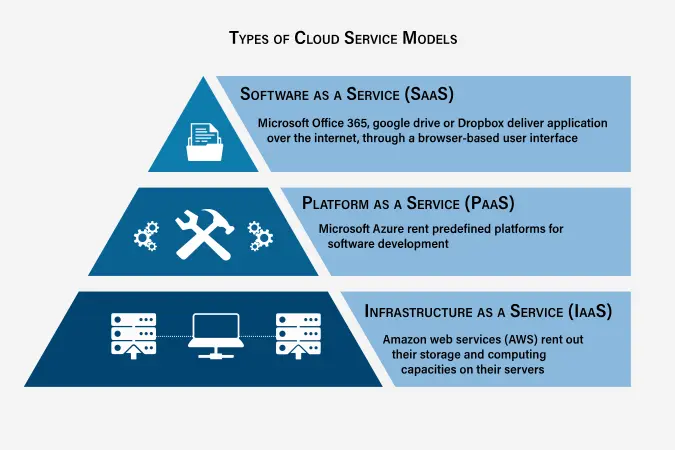
The easiest way to understand IaaS vs PaaS vs SaaS is to compare what you receive.
| Model | Full Name | What You Receive | Best For |
|---|---|---|---|
| IaaS | Infrastructure as a Service | Virtual servers, storage and networking | Teams that need flexibility and control |
| PaaS | Platform as a Service | A managed environment for building and running applications | Developers who want to focus on code |
| SaaS | Software as a Service | A ready-to-use application accessed online | Users who need a working tool without managing infrastructure |
The AWS overview explains that each model offers a different balance of control, flexibility and management. IaaS provides the basic building blocks. PaaS removes much of the work involved in managing infrastructure. SaaS gives the user a finished application.
A simple analogy can help:
- IaaS is like renting an empty but serviced apartment. The building exists, but you decide how to arrange and use the space.
- PaaS is like renting a furnished workspace. The basic environment is ready, allowing you to focus on your project.
- SaaS is like using a hotel room. The service is already prepared, and you mainly focus on using it.
The analogy is not perfect, but it captures the main idea: the further you move from IaaS toward SaaS, the less infrastructure you manage yourself.
IaaS vs PaaS vs SaaS: What Is IaaS?
Infrastructure as a Service provides cloud-based computing resources such as servers, storage and networking. Instead of buying and maintaining physical machines, a business rents the infrastructure it needs and adjusts capacity as requirements change.
In the IaaS vs PaaS vs SaaS comparison, IaaS gives the customer the most control. The provider manages the physical data centre, hardware and core infrastructure. The customer still manages important layers above that foundation, which may include operating systems, applications, data and configurations.
The AWS definition of IaaS describes it as a model that delivers IT infrastructure such as compute, storage and network resources through the internet on a pay-as-you-go basis. This can be useful when a company wants cloud flexibility without giving up detailed control over its environment.
When IaaS Makes Sense
IaaS may be suitable when a business:
- Needs virtual machines for custom applications
- Wants control over operating systems and configurations
- Has an experienced IT team
- Expects demand to change significantly over time
- Wants to move existing workloads away from physical servers
- Needs storage, backup or disaster-recovery capacity
- Runs workloads with specialized technical requirements
For example, an online retailer may use IaaS when traffic increases sharply during a major sales period. The business can add capacity without buying hardware that may sit unused later.
Benefits of IaaS
IaaS can provide flexibility, scalability and detailed control. A company can choose its operating systems, configure applications and adjust resources as demand changes. It can also reduce the upfront cost of purchasing physical infrastructure.
Limitations of IaaS
Control brings responsibility. A company using IaaS still needs the skills and time to maintain operating systems, configure services, monitor usage and protect the parts of the system it controls. A poorly managed environment can become expensive or difficult to secure.
IaaS vs PaaS vs SaaS: What Is PaaS?
Platform as a Service gives developers a managed environment for building, testing, deploying and running applications. The provider handles more of the technical foundation, allowing the customer to focus on the application and its data.
In the IaaS vs PaaS vs SaaS comparison, PaaS sits in the middle. It provides more abstraction than IaaS but more flexibility than SaaS. Developers do not need to spend as much time managing servers, operating systems and routine infrastructure tasks.
Oracle’s PaaS overview explains that PaaS delivers infrastructure and middleware components that help developers and IT administrators build and manage applications. Red Hat’s PaaS explanation similarly describes a platform supplied by another party so that users can develop, run and manage apps without building and maintaining the usual infrastructure.
When PaaS Makes Sense
PaaS may be appropriate when a team:
- Wants to build a custom web or mobile application
- Needs a faster development and deployment process
- Does not want to manage servers directly
- Wants a consistent environment for developers
- Needs tools for testing, databases or application scaling
- Values speed more than deep infrastructure control
A startup building an online booking application may choose PaaS because its developers can focus on features, customer experience and releases rather than server maintenance.
Benefits of PaaS
PaaS can reduce routine technical work and speed up application development. It may provide built-in tools, development frameworks, databases, middleware and deployment support. Teams can spend more time improving the product and less time maintaining infrastructure.
Limitations of PaaS
PaaS can be less flexible than IaaS because the provider controls more of the environment. A team may face limits involving programming languages, configurations, integrations or portability. Before committing to a platform, check whether it supports your technical requirements and whether moving away later would be difficult.
IaaS vs PaaS vs SaaS: What Is SaaS?
Software as a Service delivers a finished application through the internet. Users normally sign in through a browser or app and start working without managing servers, operating systems or application updates.
In the IaaS vs PaaS vs SaaS comparison, SaaS is the simplest option for the customer. The provider manages the application and the underlying infrastructure. The customer still needs to manage users, access permissions, account security and the information placed inside the service.
The AWS SaaS explainer describes SaaS as one of the three traditional cloud models alongside IaaS and PaaS. Common examples include web-based email, collaboration tools, customer-management software and online productivity applications.
When SaaS Makes Sense
SaaS is often the best choice when an organization:
- Needs a ready-to-use business tool
- Does not want to build custom software
- Wants quick setup and predictable access
- Needs staff to work from different locations
- Prefers the provider to handle software updates
- Wants to add or remove users without managing servers
A small business that needs email, document collaboration or accounting software will usually begin with SaaS rather than building its own system.
Benefits of SaaS
SaaS is accessible and convenient. Users can often start quickly, access the service from different devices and avoid software-maintenance work. The provider handles updates and much of the technical operation behind the application.
Limitations of SaaS
The convenience of SaaS comes with less control. A business may have limited ability to customize the software, change how data is stored or control when features are updated. It should also review pricing, user permissions, data-export options and the provider’s security documentation before relying on a service.
IaaS vs PaaS vs SaaS: Who Manages What?
The clearest difference between IaaS vs PaaS vs SaaS is responsibility. As the provider manages more layers, the customer has less technical work but also less direct control.
| Technology Layer | On-Premises IT | IaaS | PaaS | SaaS |
|---|---|---|---|---|
| Physical servers and data centre | Customer | Provider | Provider | Provider |
| Networking and storage foundation | Customer | Provider | Provider | Provider |
| Operating system | Customer | Customer | Provider | Provider |
| Runtime and middleware | Customer | Customer | Provider | Provider |
| Application | Customer | Customer | Customer | Provider |
| Business data and user access | Customer | Customer | Customer | Shared responsibility |
The exact boundary can vary between providers and products, so always read the service documentation. Microsoft’s shared-responsibility guidance explains that customer responsibilities change depending on whether a service is IaaS, PaaS or SaaS. Even when a provider manages most of the technology, the customer still has responsibilities involving data, identities, accounts and access controls.
IaaS vs PaaS vs SaaS: The Main Differences
| Question | IaaS | PaaS | SaaS |
|---|---|---|---|
| How much control do you have? | High | Moderate | Limited |
| How much technical management is required? | High | Moderate | Low |
| Who usually uses it? | IT teams and system administrators | Developers and product teams | Everyday business users |
| What is the main goal? | Rent flexible infrastructure | Build applications faster | Use finished software |
| How quickly can you begin? | Depends on configuration | Usually faster than IaaS | Usually fastest |
| Can it support customization? | Extensive | Moderate to high | Usually limited |
| What should you review carefully? | Configuration, security and costs | Platform limits and portability | Permissions, data handling and subscription terms |
This table should not be treated as a competition where one model always wins. The correct answer depends on the problem you are trying to solve.
Which Cloud Service Model Is Right for You?
When comparing IaaS vs PaaS vs SaaS for a small business or a larger organization, begin with the real task. The most useful way to choose a cloud service model is to start with your actual need rather than the popularity of a product.
Choose IaaS When You Need Control
IaaS is a sensible choice when your team needs to configure infrastructure in detail, run custom systems or move existing workloads into the cloud while keeping substantial control. It is usually better suited to organizations with technical expertise.
Choose PaaS When You Need to Build Efficiently
PaaS works well when the goal is to create and deploy an application without managing every server and operating-system task. It can help developers focus on code, testing and product improvements.
Choose SaaS When You Need a Finished Tool
SaaS is suitable when the business problem can be solved with an existing application. It is often the simplest option for email, collaboration, file sharing, customer management and other everyday tasks.
Can a Business Use All Three Models?
Yes. The IaaS vs PaaS vs SaaS decision does not require a business to choose only one model. Many organizations use a mixture.
A company might:
- Use SaaS for email, meetings and team collaboration.
- Use PaaS to build a customer-facing mobile app.
- Use IaaS for a specialized internal workload requiring detailed configuration.
IBM’s updated comparison notes that the three models are not mutually exclusive and that many enterprises use all three. A mixed approach can be practical when different teams have different needs.
The wider cloud market is also evolving. The News Ink has examined cloud trends shaping business decisions, including the growing importance of scalable online infrastructure.
Security Still Matters in Every Model
Moving to a managed service does not remove your security responsibilities. The provider may secure the physical infrastructure and operate parts of the platform, but your organization still needs to protect accounts, control access and handle data carefully.
The responsibility changes across IaaS vs PaaS vs SaaS:
- With IaaS, the customer manages more technical layers and therefore has more configuration work.
- With PaaS, the provider handles the platform foundation, while the customer remains responsible for applications and data.
- With SaaS, the provider operates most of the service, but the customer still needs strong account security, appropriate permissions and careful data practices.
Use strong login methods, review user access and remove accounts that are no longer required. The News Ink’s cybersecurity guide explains the everyday habits that support safer online services.
Cost Questions to Ask Before Choosing a Model
Cloud services can reduce upfront infrastructure spending, but careless decisions can still create unnecessary costs. Before making an IaaS vs PaaS vs SaaS decision, ask:
- How will billing work: subscription, usage-based pricing or both?
- What happens when usage rises suddenly?
- Are storage, support or data-transfer charges separate?
- Will the business need specialist staff?
- Can the service scale down as easily as it scales up?
- Is there a clear way to export data?
- Would changing providers later be difficult?
- Are important features locked behind a higher pricing tier?
A cheaper-looking option is not always the best value. Consider the total workload, staff time, maintenance effort and long-term flexibility.
Common Mistakes to Avoid
Understanding IaaS vs PaaS vs SaaS also helps businesses avoid predictable errors:
- Choosing maximum control without the skills to manage it. IaaS can be powerful, but it demands more technical work.
- Using PaaS without checking platform limits. Development can be faster, but future portability may matter.
- Buying SaaS without reviewing permissions. A ready-to-use tool still needs careful account management.
- Assuming the provider handles every security task. Responsibilities remain shared.
- Ignoring the exit plan. Review data export, migration and contract terms before becoming dependent on a service.
- Overcomplicating a simple need. Do not build a custom platform when a suitable SaaS tool already solves the problem.
- Treating every workload the same way. Different teams may reasonably use different models.
A Simple IaaS vs PaaS vs SaaS Decision Checklist
| Ask This Question | Likely Best Starting Point |
|---|---|
| Do we need virtual servers and detailed configuration control? | IaaS |
| Are we building an application but trying to avoid server management? | PaaS |
| Do we simply need a finished online tool? | SaaS |
| Do we have an experienced technical team? | Consider IaaS or PaaS |
| Is fast setup more important than deep customization? | Consider SaaS |
| Do different departments have different needs? | Use a combination |
Frequently Asked Questions About IaaS vs PaaS vs SaaS
What Is the Simplest Explanation of IaaS vs PaaS vs SaaS?
IaaS provides infrastructure, PaaS provides a development platform and SaaS provides finished software. The key difference is how much the provider manages for you.
Which Model Gives the Customer the Most Control?
IaaS gives the customer the most control over the environment above the physical infrastructure. That flexibility also creates more responsibility.
Which Model Is Easiest for a Small Business?
SaaS is often the easiest starting point because it delivers a ready-to-use application. The best choice still depends on the business need.
Is PaaS Only for Large Companies?
No. PaaS can be useful for startups, small development teams and larger organizations. It is designed for teams that want to build and deploy applications without managing every infrastructure layer.
Is Cloud Storage IaaS or SaaS?
It depends on the product and how it is used. A business may rent raw storage capacity as infrastructure, while an everyday file-sharing application may be delivered as SaaS.
Are IaaS, PaaS and SaaS the Only Cloud Models?
No. They remain the traditional core models, but other services exist, including serverless computing and Function as a Service. The three-model comparison is still the best starting point for beginners.
Can One Company Use IaaS, PaaS and SaaS Together?
Yes. Many organizations combine them. The right model depends on each workload, team and business goal.
Choose the Service Model That Solves the Real Problem
The IaaS vs PaaS vs SaaS comparison becomes easier when you stop asking which model is universally best. The better question is: how much control do you need, how much technical work can your team manage and what outcome are you trying to achieve?
Choose IaaS when flexibility and infrastructure control matter. Choose PaaS when developers need a managed platform for building applications. Choose SaaS when an existing online tool solves the problem without additional development. In many organizations, the sensible answer is a combination of all three.
For more practical explanations of digital infrastructure, read The News Ink’s cloud computing guide and follow our Medium profile for useful technology articles.