Hybrid Cloud Explained: 7 Powerful Benefits and Critical Challenges
A business does not always have to choose between keeping every system inside its own data centre and moving everything into a public cloud. Many organizations use a middle path. A hybrid approach combines different computing environments so that applications, data and services can run where they make the most sense.
This approach can help a company keep sensitive workloads under tighter control while still using public cloud resources when it needs flexibility, speed or additional capacity. However, the model is not a simple shortcut. It can create new security, integration, monitoring and cost-management challenges when the environments are poorly planned.
The most useful way to understand this approach is to treat it as an operating model rather than a product. It connects distinct environments through technology, policies and management processes. This article explains how the model works, the seven main benefits it can offer and the critical challenges a business should address before adopting it.
For a broader introduction to online infrastructure, read The News Ink’s cloud computing guide.
What Is Hybrid Cloud?
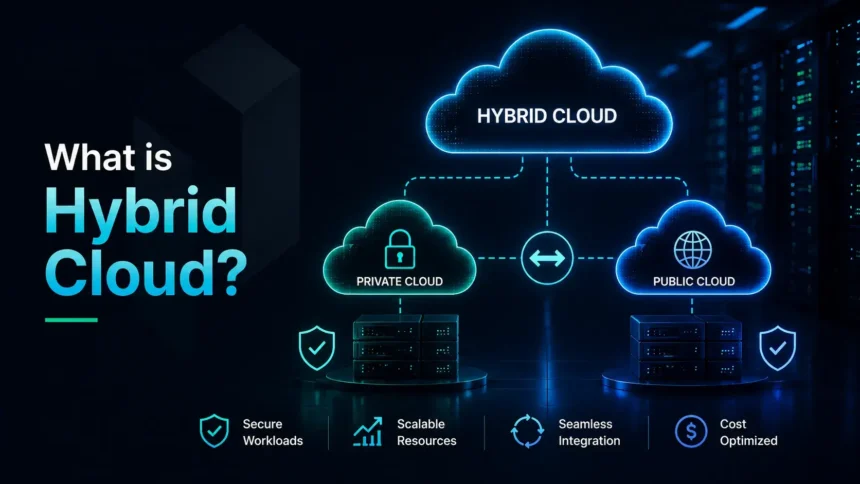
A hybrid cloud is a computing approach that combines more than one environment. A common setup connects a private cloud or on-premises system with public cloud services. The environments remain distinct, but applications, data or workloads can move between them or operate across them.
The NIST definition describes this infrastructure as a composition of two or more distinct cloud infrastructures that remain separate but are connected by technology that supports data and application portability. Microsoft Azure offers a practical explanation: public and private environments can share applications, services and workloads, allowing organizations to decide where each workload should run.
In simple terms, a company can keep some systems close to home while using external cloud resources for other tasks.
Hybrid Cloud vs Public Cloud vs Private Cloud
The differences become clearer when the three models are compared directly.
| Cloud Model | Where Resources Run | Main Advantage | Main Limitation |
|---|---|---|---|
| Public cloud | Infrastructure operated by a third-party provider and shared through online services | Flexible access and rapid scaling | Less direct control over the underlying infrastructure |
| Private cloud | Infrastructure dedicated to one organization, often in its own data centre or a controlled hosted environment | Greater control and customization | Higher management burden and infrastructure cost |
| Hybrid cloud | A connected mix of private, on-premises and public cloud resources | Workloads can be placed according to business needs | Integration and management become more complex |
A hybrid model is not automatically better than the alternatives. A small business using standard online tools may not need a complicated architecture. A larger organization with legacy systems, regulated information or fluctuating demand may have stronger reasons to use a mixed environment.
The News Ink’s explanation of IaaS vs PaaS vs SaaS can help readers understand a separate question: how much of the technology stack should be managed by the provider?
How Does Hybrid Cloud Work?
A mixed setup links environments so that they can exchange information and support business operations. The connection may involve networking, identity controls, application programming interfaces, data synchronization, automation tools and consistent security policies.
A retailer may run its core inventory system in a private environment while using public cloud capacity during a seasonal sales surge. A healthcare organization may keep sensitive records in a controlled environment while using cloud-based tools for selected analytics workloads. A manufacturer may process some information close to its equipment while sending other data to cloud systems for reporting and planning.
The exact design depends on the organization. There is no single template that fits every business. The important question is not whether the company has more than one environment. It is whether those environments are connected in a deliberate, manageable and secure way.
7 Powerful Benefits of Hybrid Cloud
1. Greater Flexibility for Different Workloads
One of the strongest benefits of a hybrid cloud is choice. A company can decide where a workload should run based on sensitivity, performance requirements, technical dependencies and cost.
Some applications may work well in a public cloud. Others may need to stay close to existing equipment or internal systems. A mixed model allows the business to avoid forcing every workload into the same environment.
This flexibility is especially useful during a gradual modernization program. Instead of replacing everything at once, a company can move selected services in stages and review the results before continuing.
2. Better Control Over Sensitive Data
A hybrid setup can help organizations keep specific data or applications in a controlled environment while still benefiting from public cloud services elsewhere. This may be useful when a business has strict internal policies, contractual obligations or regulatory requirements.
Control does not automatically mean security. A private environment still needs strong access rules, software updates, backups and monitoring. However, the model gives the organization more options when deciding where sensitive information should be stored and processed.
The News Ink’s cybersecurity guide explains why account protection, secure access and careful data handling remain important across every online system.
3. Easier Scaling During Demand Spikes
Demand does not always remain stable. An ecommerce site may receive a large increase in visitors during a major sale. A streaming platform may experience a sudden surge after a popular release. A business system may need extra computing power during reporting periods.
A hybrid approach can allow an organization to use additional public cloud capacity when demand rises instead of buying permanent hardware for occasional peaks. This practice is sometimes called cloud bursting.
The benefit is not only technical. It can help a company avoid building an expensive private environment large enough to handle its busiest possible day when most days require far fewer resources.
4. A More Gradual Cloud Migration
Moving an established organization into the cloud can be difficult. Older applications may depend on internal databases, specialized equipment or custom processes. Replacing everything at once can create operational risk.
A mixed cloud environment can support a phased transition. A company may begin with backups, testing environments, selected applications or new customer-facing services. It can then move additional workloads after reviewing performance, cost and security.
AWS guidance identifies ongoing cloud migration as one of the common reasons organizations build hybrid architectures. A gradual approach can be more realistic than a sudden all-or-nothing move.
5. Improved Business Continuity and Recovery Options
A hybrid strategy can support business continuity when it is designed carefully. Data backups, replicated systems and recovery processes may be distributed across environments so that one failure does not stop every operation.
For example, a company may keep backup copies in a separate cloud environment or use public resources during a disruption affecting its normal infrastructure. However, the presence of multiple environments does not automatically create resilience. Backups must be tested, recovery roles must be clear and the organization must know how to restore essential services.
6. Support for Low-Latency and Edge Use Cases
Some applications cannot wait for data to travel a long distance to a remote data centre and back. Manufacturing systems, connected devices and time-sensitive services may need faster local processing.
A hybrid setup can connect central cloud resources with on-premises or edge systems. This allows some data to be processed closer to where it is created while other information is sent to the cloud for analysis, storage or broader coordination.
Google Cloud describes hybrid environments as combinations that may include public clouds, private clouds, on-premises data centres and edge locations. The model can therefore support workloads that need both local responsiveness and cloud-scale resources.
7. Better Use of Existing Technology Investments
Organizations often have servers, applications and business systems that cannot be discarded immediately. A mixed model allows them to use selected existing infrastructure while adding cloud services where the benefits are clear.
This can be practical for businesses with valuable legacy systems. However, keeping old technology forever is not a strategy. The organization should identify which systems still provide value, which should be modernized and which should eventually be retired.
The News Ink has also examined broader cloud trends affecting business decisions.
Hybrid Cloud Benefits Summary
| Benefit | Practical Value |
|---|---|
| Flexible workload placement | Run each application where it fits best |
| Sensitive-data control | Keep selected information in a controlled environment |
| Scalable capacity | Use extra resources during peak demand |
| Gradual migration | Modernize in stages rather than moving everything at once |
| Business continuity | Build recovery options across separate environments |
| Edge support | Process time-sensitive data closer to users or devices |
| Existing investment value | Continue using useful systems while adopting cloud services |
Critical Hybrid Cloud Challenges
The benefits are real, but the model can become difficult to manage when a business adds complexity without a clear plan.
1. Integration Can Become Complicated
Connecting cloud services with internal systems requires careful planning. Applications may use different formats, security rules and technical standards. Data must move reliably between environments, and older systems may not connect easily with modern tools.
A weak integration plan can create delays, duplicated information and fragile workarounds. Before adoption, identify the applications that need to communicate, the data that needs to move and the teams responsible for maintaining each connection.
2. Security Must Be Consistent Across Environments
A mixed setup expands the number of systems that need protection. A business may have cloud accounts, local servers, remote users, application interfaces and several monitoring tools. A security rule that works in one environment may not be applied automatically in another.
Red Hat defines hybrid cloud security as the protection of data, applications and infrastructure across connected environments. The practical goal is consistency: clear identity rules, limited permissions, encryption where appropriate, patch management, logging and incident-response procedures.
Hybrid cloud security should be designed into the architecture rather than added after deployment.
3. Costs Can Be Difficult to Track
The approach may reduce some infrastructure expenses, but it can also create confusing bills. Public cloud services may charge for compute time, storage, data transfer, backups, support and additional features. Internal systems still require staff, hardware, electricity and maintenance.
A company should calculate the total cost rather than compare one cloud subscription with the purchase price of a server. A well-planned hybrid cloud budget should include both online usage and internal operating costs.
Set budgets, review usage and remove resources that are no longer needed.
4. Teams Need the Right Skills
A mixed environment requires knowledge of networking, cloud services, security, automation and existing internal systems. The organization may need training, specialist support or clearer responsibilities between teams.
Tools can help, but they do not replace planning. A business should know who manages access, who monitors performance, who approves changes and who responds when a service fails.
5. Poor Planning Can Create Vendor Lock-In
A company may become dependent on a provider’s tools, interfaces or pricing structure. This does not mean every specialized service should be avoided. It means portability should be considered before a system becomes difficult to move.
Ask whether data can be exported, whether applications rely on proprietary features and whether the business has a realistic exit plan. The goal is not to avoid commitment entirely. It is to understand the consequences before making long-term decisions.
Hybrid Cloud Challenges Table
| Challenge | Why It Matters | Practical Response |
|---|---|---|
| Integration complexity | Systems may not exchange data smoothly | Map dependencies before migration |
| Inconsistent security | Gaps can appear between environments | Apply common access, logging and update policies |
| Cost visibility | Usage-based charges may grow unexpectedly | Monitor spending and set budgets |
| Skills gap | Teams may struggle to manage a mixed setup | Train staff and define clear responsibilities |
| Vendor lock-in | Moving later may become difficult | Review portability and data-export options |
Is Hybrid Cloud the Same as Multi-Cloud?
No. The terms are related but not identical.
Hybrid cloud usually means that different types of environments are connected, such as a private system and a public cloud. Multi-cloud means that an organization uses services from more than one cloud provider. A company can use one approach without the other, or use both together.
| Term | Simple Meaning |
|---|---|
| Hybrid cloud | Connected mix of environments, often including private or on-premises systems and public cloud resources |
| Multi-cloud | Use of services from more than one cloud provider |
| Hybrid multi-cloud | A connected architecture that combines private or on-premises systems with services from multiple providers |
The distinction matters because each model creates different management, security and cost questions.
When Does Hybrid Cloud Make Sense?
A hybrid approach may be worth considering when an organization:
- Has important systems that cannot move immediately
- Needs more control over selected data or applications
- Wants to modernize gradually
- Experiences major changes in demand
- Needs backup and recovery options across environments
- Uses equipment or edge systems that require local processing
- Has a technical team capable of managing a mixed setup
Hybrid cloud may be unnecessary when a smaller organization can meet its needs with straightforward SaaS tools and a limited number of public cloud services. Complexity should solve a real problem.
A Practical Hybrid Cloud Planning Checklist
Before adopting a hybrid model, ask:
- Which workloads need to remain in a controlled environment?
- Which applications can move to public cloud services?
- What data must move between systems?
- How will identities, permissions and login methods be managed?
- Who will monitor security, performance and cost?
- What happens if one environment becomes unavailable?
- How will backups be tested?
- Which provider-specific features are essential?
- Can data be exported if the strategy changes?
- Does the business have the skills to manage the architecture?
A clear answer to these questions is more valuable than adopting a complicated setup because it sounds modern. Careful hybrid cloud planning should begin with business needs rather than fashionable terminology.
Frequently Asked Questions About Hybrid Cloud
What Is Hybrid Cloud in Simple Words?
A hybrid cloud is a connected mix of computing environments. A company may keep some systems in its own data centre or private cloud while using public cloud services for other workloads.
Is Hybrid Cloud More Secure Than Public Cloud?
Not automatically. It can give a business more control over selected workloads, but it also creates more systems to protect. Security depends on access rules, updates, monitoring and careful design.
Is Hybrid Cloud Expensive?
It can be cost-effective when workloads are placed carefully and usage is monitored. It can also become expensive when services, data transfers and internal infrastructure are poorly managed.
Can Small Businesses Use Hybrid Cloud?
Yes, but many small businesses do not need a complex setup. The model makes sense when it solves a specific requirement, such as integrating an existing system with cloud services.
What Is Cloud Bursting?
Cloud bursting is the use of extra public cloud capacity when demand exceeds the normal capacity of a private environment. It can help during temporary traffic spikes or heavy workloads.
What Is the Difference Between Hybrid Cloud and Multi-Cloud?
A hybrid cloud connects different types of environments. Multi-cloud involves services from more than one cloud provider. A company may use both approaches together.
Does Hybrid Cloud Replace On-Premises Systems?
Not necessarily. It can connect existing systems with cloud services and support gradual modernization. Over time, some internal systems may remain while others are replaced or moved.
Choose Hybrid Cloud for a Clear Business Reason
A hybrid cloud can offer flexibility, control and a realistic path toward modernization. It can help businesses scale selected workloads, protect sensitive information, support edge systems and make better use of existing technology investments.
However, the model also creates responsibility. Integration, security, monitoring and cost management must be planned carefully. A complicated architecture should not be adopted simply because it is fashionable. The strongest hybrid strategy is the one built around a clear operational need.
For more practical technology explanations, read The News Ink’s cloud computing guide and follow our WhatsApp channel for useful updates.